Learn / Online Side Hustles: Legit, Fits Your Home, First Dollar

Sell Digital Products and Build a Newsletter That Pays
Sell digital products and grow a paid newsletter: 2026 platform fees, Substack vs beehiiv math, sponsor rates, and how many readers your target needs.
Digital products and newsletters pay only after an audience exists. The file is the easy part. The readers are the business. This guide shows how many readers a money target needs, what each platform keeps from each sale, and a 30-day test to run before you build anything big.
You spend three weekends building a $29 template pack. You list it, post the link twice, and sell two copies. The product was fine. The problem was the forty people who saw it.
The bottleneck: the audience, not the product
Not the product idea, not the platform, not the price. The bottleneck is the number of people who'll open your email and buy from you.
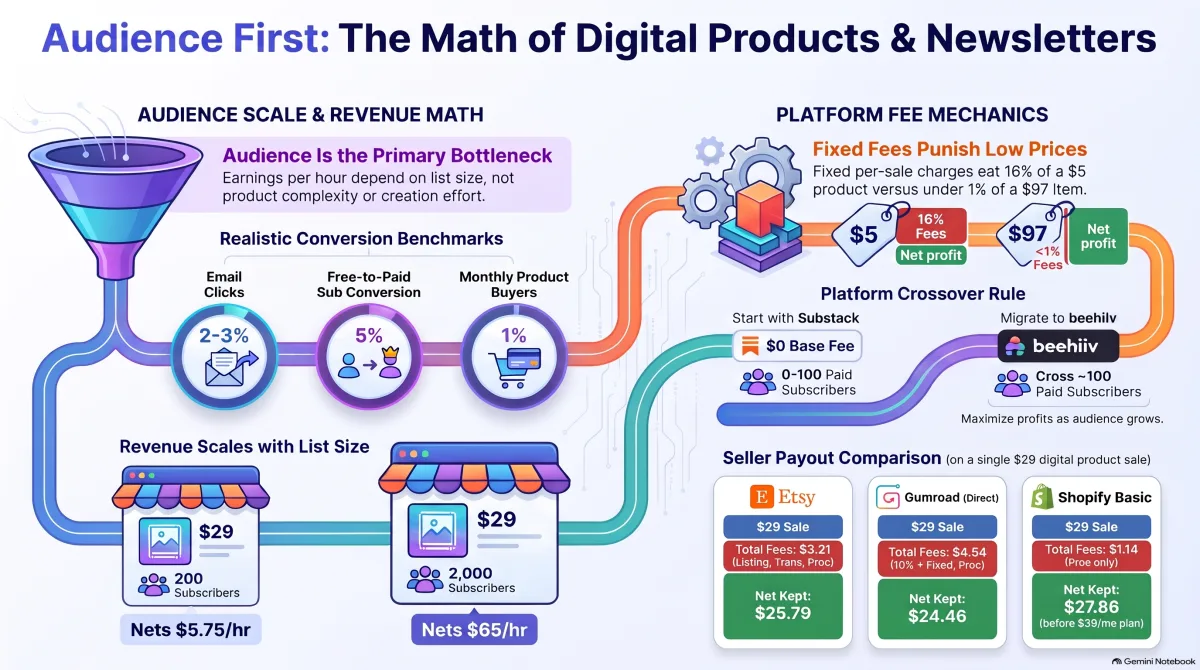
In the worked example below, the same $29 template and $8 newsletter earn about $5.75 an hour at 200 subscribers and about $65 an hour at 2,000. Same product, same price, same effort. Only the audience changed. So this guide runs in that order: readers first, then product, then platform, then revenue.
How many readers you need
Work backward from the money. Pick a monthly target, then ask what audience produces it. Three conversion facts decide the answer.
Clicks, not opens. Mailchimp's benchmarks put the all-user average open rate at 35.63% and click rate at 2.62%; ecommerce lists run 29.81% and 1.74%. Opens are inflated, because Apple Mail Privacy Protection can register an open whether or not a person reads the email. A click is a human act. Plan on a few percent of your list clicking in a given issue, and treat open rates as directional.
Free readers convert to paid slowly. Substack's own going-paid guide says it tends to see 5% to 10% of free subscribers convert to paid, with 10% a rate to aim for. Plan on the low end. Five percent of 2,000 free readers is 100 paying subscribers. Five percent of 200 is ten.
Product buyers are a slice of a slice. A reader has to open, click, and pay. This guide uses 1% of the free list buying in a launch month. That's an SHR planning assumption, not a published benchmark. It depends on the product, the price, and how warm your list is. If your list buys at half that rate, the product line in the math halves with it.
So the honest order is: content earns subscribers, subscribers earn buyers, buyers earn revenue. Anyone selling you the reverse order is selling you a file nobody sees.
Pick a product that fits the audience you can reach
Start small. A first product should solve one problem you've already answered for real people: a budget spreadsheet, resume templates, a printable planner, a preset pack, a short how-to guide. If nobody has ever asked you the question your product answers, you don't have a product yet. You have a guess.
Build the one-page version first. Before the template pack, the single worksheet. Before the course, the one guide. Pre-sell five copies of the small version. Five buyers prove demand and that your description matches what people thought they were buying.
What counts as a product:
- Templates and printables: spreadsheets, planners, trackers, resumes. Cheap to make, easy to preview. The best first product for most readers.
- Guides and ebooks: short and specific, priced on the problem, not the page count.
- Presets and assets: photo presets, design files, code snippets. The buyer's test is instant: does it work in my tool right now?
- Courses: the biggest build and biggest support load. A second or third product, not a first, and many course platforms bill monthly before you've sold anything.
Price on what the problem is worth to a buyer who already trusts you, then check the fee stack.
Price it through the fee stack
Every platform takes a cut, and the headline rate is never the whole story. Here's what a $29 digital sale keeps on three platforms beginners meet first. These pages change; check each one before you build on it.
- Etsy: $0.20 listing fee + 6.5% transaction fee ($1.89) + 3% + $0.25 US payment processing ($1.12) = $3.21 in fees. You keep $25.79. Sources: Etsy fees and Etsy Payments policy.
- Gumroad, direct sale: 10% + $0.50 (Gumroad pricing), or $3.40. Gumroad's pricing page doesn't say whether card processing is included, so this guide assumes a conservative 2.9% + $0.30 on top ($1.14). Total $4.54. You keep $24.46. Sales through Gumroad's Discover marketplace cost 30%.
- Shopify Basic with Shopify Payments: 2.9% + $0.30 ($1.14), plus a $39 monthly plan billed monthly, or $29 a month billed yearly (Shopify pricing). You keep $27.86 per sale before the plan.
That corrects two common beliefs. First, Etsy, the "expensive" marketplace, keeps more per $29 sale than Gumroad's stack as assumed here, because fixed per-sale charges bite hardest at low prices. Second, Shopify's per-sale cost is lowest, but only if you sell enough to cover the plan. Against Gumroad, Shopify keeps $3.40 more per sale, so $39 ÷ $3.40 is about 11.5 sales. At 12 or more $29 sales a month, Shopify Basic wins. Below that, the plan eats you. Don't pay a monthly plan to sell to nobody.
Three fee facts that change the choice:
- Etsy's listing fee repeats. Listings expire after four months and auto-renew at $0.20, and on a multi-quantity listing a renewal fee is charged as each unit sells. Offsite Ads charge 15% on attributed orders, or 12% once your shop passes $10,000 in sales over the prior 365 days, capped at $100 per order. Shops under $10,000 can opt out. What Etsy sells you is traffic you didn't have to find yourself.
- Gumroad is the merchant of record. Its pricing page says it handles sales tax collection and remittance, which saves real admin time the fee math doesn't show.
- Fixed fees punish low prices. On a $97 product, $0.80 of fixed charges is under 1%. On a $29 product it's about 2.8%. On a $5 printable it's 16%. If a problem is only worth $5, sell it inside a bundle, not alone.
The newsletter's four revenue lines
A newsletter earns four ways, in roughly the order they switch on.
- Paid subscriptions. Substack's fee page lists 10% to Substack, Stripe's 2.9% + $0.30 per card payment, and a 0.7% recurring billing fee. On an $8 monthly subscription that's $0.80 + $0.23 + $0.30 + $0.06 = $1.39 per subscriber per month. Publishing free costs nothing, which is why Substack suits a small list: no monthly bill while you can least afford one.
- Sponsorships. An advertiser pays for a slot in an issue. Book a Sponsor read the rate cards of 377 newsletters on November 4, 2026, and found the median main-slot price at $150 under 5,000 subscribers, $300 at 5,000 to 19,999, $500 at 20,000 to 49,999, and $1,200 at 100,000 or more. Per 1,000 subscribers that falls from about $74 to about $7 as lists grow. A dedicated send prices around 2.34 times the main slot; a second slot about half; a classified about 40%. These are published asking prices, not guaranteed deals, and the largest size bands hold few newsletters. Sponsors care about real readers, so quote opens and clicks, not just list size: 2,000 subscribers at Mailchimp's 35.63% average is about 713 opens, so a $150 slot is about $210 per 1,000 opens.
- Product and affiliate sales to the list. The newsletter is the distribution channel for your product. This line often pays first, because it needs no sponsor and no paywall.
- Services and upsells: audits, customization, calls, workshops. High-priced, but they eat the same weekly hours the newsletter needs. Treat them as a bonus line.
Pick the newsletter platform by the crossover, not the brand
Substack versus beehiiv has an arithmetic answer. Substack is free to publish and takes 10% once you charge. Beehiiv takes 0% of subscription revenue but charges a plan fee on paid tiers, and its prices changed for new customers on October 1, 2026. Beehiiv's pricing lists Lite at $59 a month up to 1,000 subscribers, $79 up to 2,500, and $139 up to 10,000 on monthly billing, with cheaper annual billing. The free plan covers up to 2,500 subscribers. Older guides quoting lower prices are out of date.
The crossover, on platform fees alone (card processing applies on both): Lite at 2,500 subscribers is $79 a month. Substack's 10% on an $8 subscription is $0.80 per paid subscriber. $79 ÷ $0.80 is about 99 paid subscribers. Below roughly 100 paid subscribers at $8, Substack costs less. Above it, a flat plan beats a percentage, and the gap widens as you grow. Start on Substack while the list is small. Move when your paid count crosses the line. Keep your list exportable so you can.
The Stack Sheet
The Stack Sheet is a one-page revenue stack for one product plus one newsletter. Each revenue line, what it needs, what it nets after fees, and a bottom line showing the gap to a stated target and what closes it. If your sheet has no gap row, it's built wrong. Every real stack has a gap until the audience is big enough.
Named inputs (all examples or assumptions, labeled):
- Product: a $29 budget spreadsheet template (example price), sold on Gumroad direct at $4.54 in fees per sale as assumed above.
- Newsletter: weekly, free tier plus an $8-a-month paid tier (example price) on Substack, $1.39 in fees per paid subscriber.
- Paid conversion: 5% of free readers (low end of Substack's 5% to 10%).
- Product purchase: 1% of the free list in a month (SHR planning assumption).
- Sponsorship: one main slot a month at $150 (Book a Sponsor's median under 5,000), only once a sponsor will buy.
- Hours: 20 a month (example: four issues at three hours each, plus eight hours of support and sponsor outreach).
Month A, 200 free subscribers:
- Paid subs: 10 × $8 = $80 gross, $13.88 fees, $66.12 net.
- Sponsorship: $0. No sponsor buys a 200-person list.
- Product: 2 × $29 = $58 gross, $9.08 fees, $48.92 net.
- Total net: $115.04, or about $5.75 an hour over 20 hours.
Month B, 2,000 free subscribers:
- Paid subs: 100 × $8 = $800 gross, $138.80 fees, $661.20 net.
- Sponsorship: one slot, $150.
- Product: 20 × $29 = $580 gross, $90.80 fees, $489.20 net.
- Total net: $1,300.40, or about $65 an hour over 20 hours, gross, before taxes.
- Target: $2,000 a month. Gap: $699.60.
What closes the gap: at these rates, each free subscriber is worth about $0.65 a month in net revenue (about $0.33 from paid conversion, $0.24 from product sales, $0.08 from sponsorship). $699.60 ÷ $0.65 is about 1,100 more free subscribers. Not a second product. Not a price hike. Not a new platform. About 1,100 more readers. That's the bottleneck as a number.
The hourly rate is a function of audience size, not a property of the product. Anyone quoting an hourly rate for digital products without naming the list size behind it is quoting a fantasy. To test your own price against your own costs, use the Side Hustle Pricing Calculator.
Friction: the parts nobody posts about
Refunds. A digital file can't be returned once it's downloaded, so vague product pages turn into refund requests. Gumroad's terms say an account with a refund rate above 25% may be suspended, terminated, or face extra conditions or fees. What protects you: an exact file list on the sales page, a preview, proof of delivery, and a written refund policy that clearly covers delivery failures. A "no refunds" line doesn't override platform terms or the law.
Piracy and sharing. A template can be forwarded in one email. License terms and watermarks reduce casual sharing; they don't stop a determined copier. Sell to a list that knows you, keep the paid version the newest version, and price for the buyers, not the pirates.
Platform fees move. Beehiiv changed prices this fall. Etsy and Gumroad have changed fees before. A fee table needs a date on it. Re-check the pricing page before you commit.
Email law and deliverability. In the US, the FTC's CAN-SPAM guide requires truthful header information, non-deceptive subject lines, a clear way to opt out honored within 10 business days, and a valid physical postal address. Readers in other countries may bring other rules. The bigger practical risk is the spam folder. Never buy a list, never add people who didn't ask, and clean out bounces and long-term non-clickers.
Churn. Paid subscribers cancel. Sponsor slots have to be sold again every month. Products sell in launches and then taper. Budget for some paid subscribers leaving each month, and replace them from the free list before you count growth.
Taxes and rights. Payment forms report gross payments, not profit, so keep your own records of fees, refunds, and costs, and talk to a tax professional about your state. You need the right to sell every element in a product: fonts, stock images, music, templates, and AI-generated material. If you can't show you have the right to sell a piece, cut it before launch.
Who should wait
Don't start with a paid product if you have no audience, no topic people ask you about, and no weekly hours to publish. Spend that time publishing free content on one topic, in one place, every week, until strangers start asking you questions. When the same question arrives three times, you have a product topic. When a hundred strangers subscribe to hear your answer, you have a launch list.
The test: 30 days, one product, 100 subscribers
Don't build the business. Run the test. Each part has a pass line:
- Pick the topic from repeat questions. Look through your messages and comments for a question people have asked you more than once. If none repeats, publish free for a month and watch what people ask.
- Publish four free issues, one a week, same day, same topic. Each answers one question completely. No pitch until issue four.
- Land 100 subscribers from one channel only: short video, a community you already belong to, or search. One channel teaches you what works.
- Pre-sell five copies of the one-page version before building the full product.
If it fails, read the symptom:
- Under 100 subscribers after four issues: the topic is too broad or the channel is wrong. Narrow to one reader with one problem, and move to the channel where that reader already spends time.
- Subscribers but no sales: the product doesn't match what readers asked for. Build from their questions, and add an exact file list and a preview.
- Sales but refunds: the description overpromised. Cut every claim the file doesn't deliver.
- Tempted to price at zero to force sales: don't. A free product teaches your list your work costs nothing.
Still choosing whether this is your hustle? Start with how to start a side hustle. If you'd rather build an asset that ranks in search, compare it with calculator and directory websites, and if you'd rather sell content to brands than to readers, see how to become a UGC creator.
Your next step: put your target month into the Income and Hourly Pay Calculator with your real weekly hours, and see what list size your Stack Sheet actually needs.